![TD-Logos-06.png]](https://knowledge.techdefenders.com/hs-fs/hubfs/TD-Logos-06.png?height=48&name=TD-Logos-06.png)
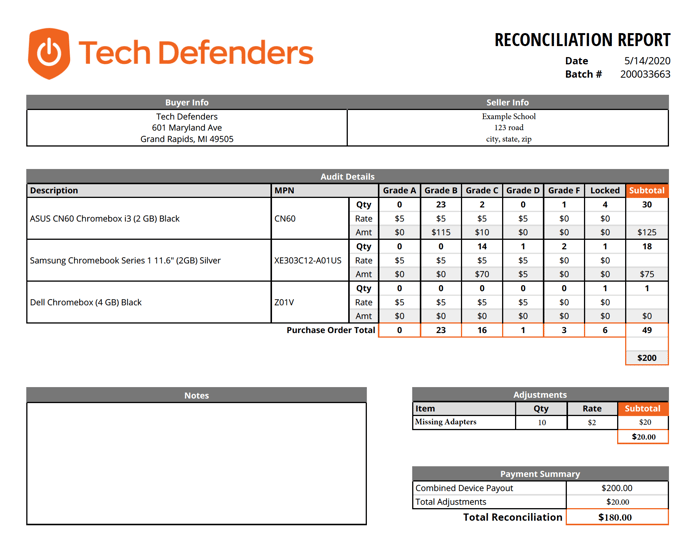
Once your buyback has been completed and your check is being written, your rep will send you a 'Reconciliation Report'. The Reconciliation Report is a full report, both summarized and detailed that shows you exactly how your devices graded, and why, and it will list out the total payout for the devices.
Summarized Report
A look at the columns:
Description: The description column on the reconciliation report will provide the make/model of your devices.
MPN: The MPN of the devices in the batch. Read here for a description of what an MPN is
Grades A-Locked: This gives a summary of your batch 'grade out'. Check out this article for a full description of our grading scale: What You Don't Know About Device Grading
- Qty - will show the number of your devices that graded out at the different letter grades
- Rate - price we are paying for that model and that grade
- Amount - total payout for that grade, model, summed by the quantity
Subtotal: the subtotal of each MPN payout, sum of all grades of a specific MPN
Purchase Order Total: quantities purchased of each grade
Adjustments: expenses, or deductions taken from total payout
Notes: any notes regarding specifics of the batch will be added as well.
Payment Summary: the total reconciliation at the bottom of the report will show how much payment is expected for the buyback.
Detailed Report
The detailed report will be sent to you in an excel document with each row showing individual serial numbers and the ultimate grade that was assigned to the device by our processing team. You will see individual results for the tests that the device went through and if the device passed the test or failed the test.
The overall grade is determined by the: cosmetic condition, and the functionality.